
Accuracy checks what AI says about you against your brand facts, and sometimes it flags a claim it should not. You can say so, and say why.
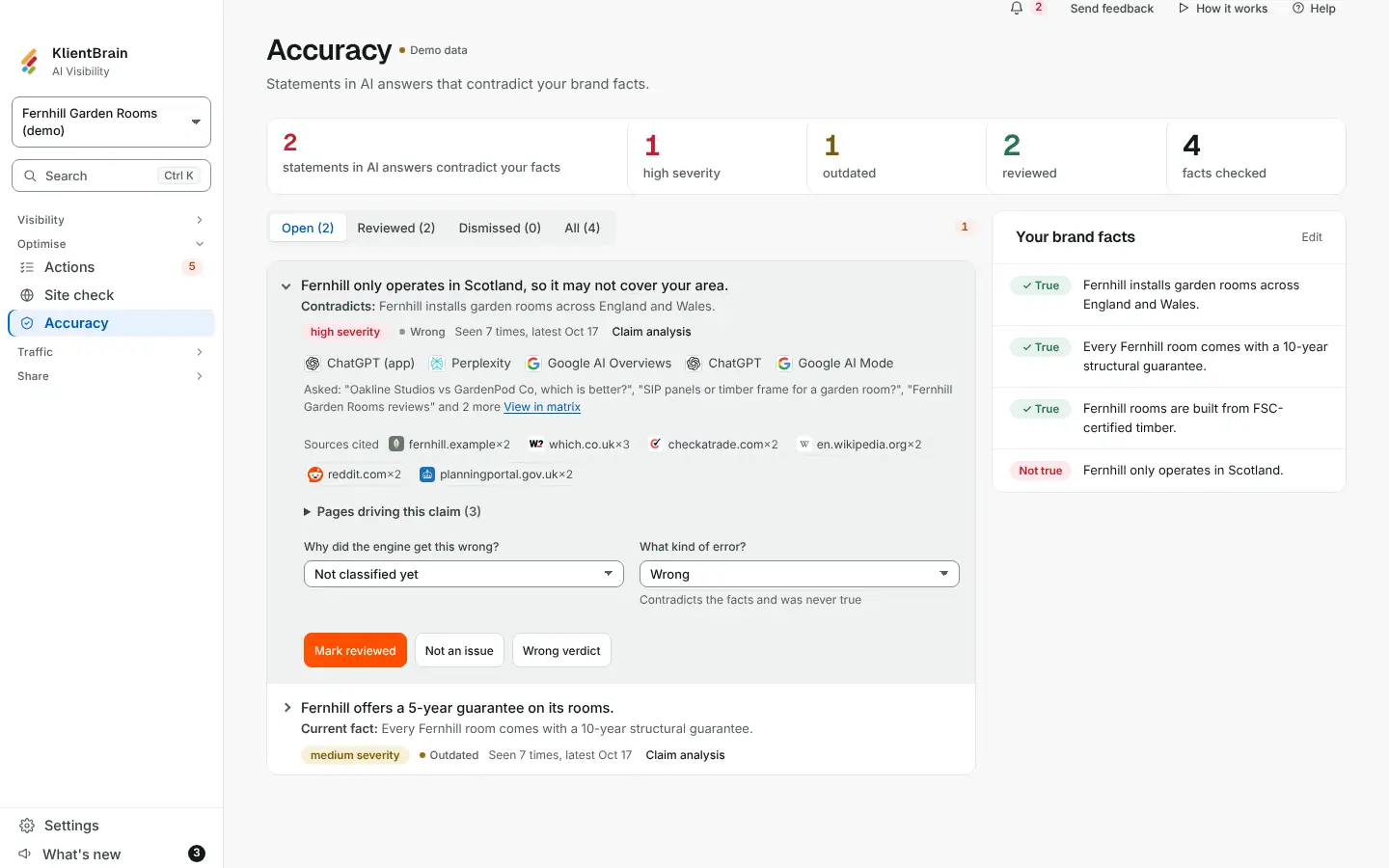
Choose a reason
On an open claim in Accuracy, besides Mark reviewed, there are two buttons:
- Not an issue: the statement is fine.
- Wrong verdict: the check got this wrong, and the statement does not contradict your facts.
Both apply to every repeat of the claim at once, and both keep the claim out of your counts until you restore it. The difference is the reason kept with it, so you have a record of where the check was wrong.
See and undo it
A decided claim carries a badge: Reviewed, Not an issue or Wrong verdict. The Dismissed filter lists both kinds. Choose Restore on a dismissed claim to put it back as open, which also clears the reason.
Good to know
- The change is recorded in the audit log, naming the claim and the choice, for example Wrong verdict: <the claim>.
- A wrong verdict only records your call. It does not change how future checks are made.
- The reason is not sent to the API or the Claude Skill.
- When this is not switched on for your workspace, the single Not an issue button and Reopen work as before.
See Accuracy and brand facts for the rest of the review steps.