
When you mark a fix Done on the Actions page, the Visibility over time chart on the Overview shows it, so you can see what happened to your visibility afterwards.
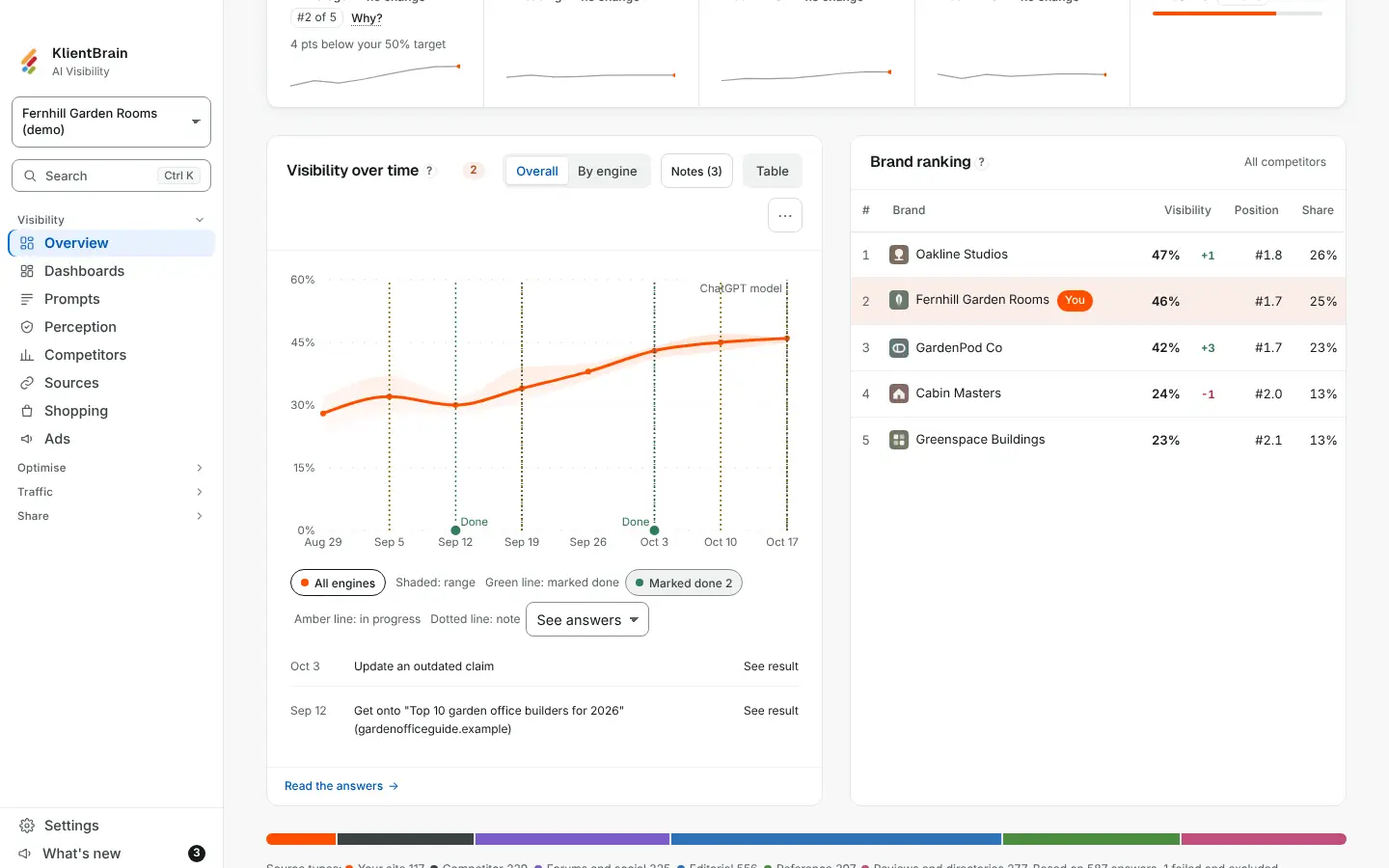
What you see
- A small green dot sits on the chart floor on each day a fix was marked done. When more than one fix was marked that day, the dot holds a number.
- Hover, focus or tap the dot to open a card that names each fix, with a See result link. The link opens Actions on that fix, on the Done tab, where its result sits.
- Under the chart, a Marked done button lists the same fixes by date, each with the same See result link. It works with a keyboard and a screen reader. The chart itself is hidden from screen readers.
The same chart on a dashboard shows the markers too.
Where a marker sits
A marker sits on the first check on or after the day the fix was marked done. A fix marked done before your first check has no marker.
Limits
- Markers need the Results feature on the Actions page, because See result goes to a result. With Results off, there are no markers.
- The trend in a report, and in a shared report, has no markers.
- The chart does not draw a goal line.
See Actions for marking a fix done.