
On the Actions page, site fixes can show how much of a page's AI readiness score a problem costs. It is an estimate of the readiness score from your latest Site check, not of AI visibility.
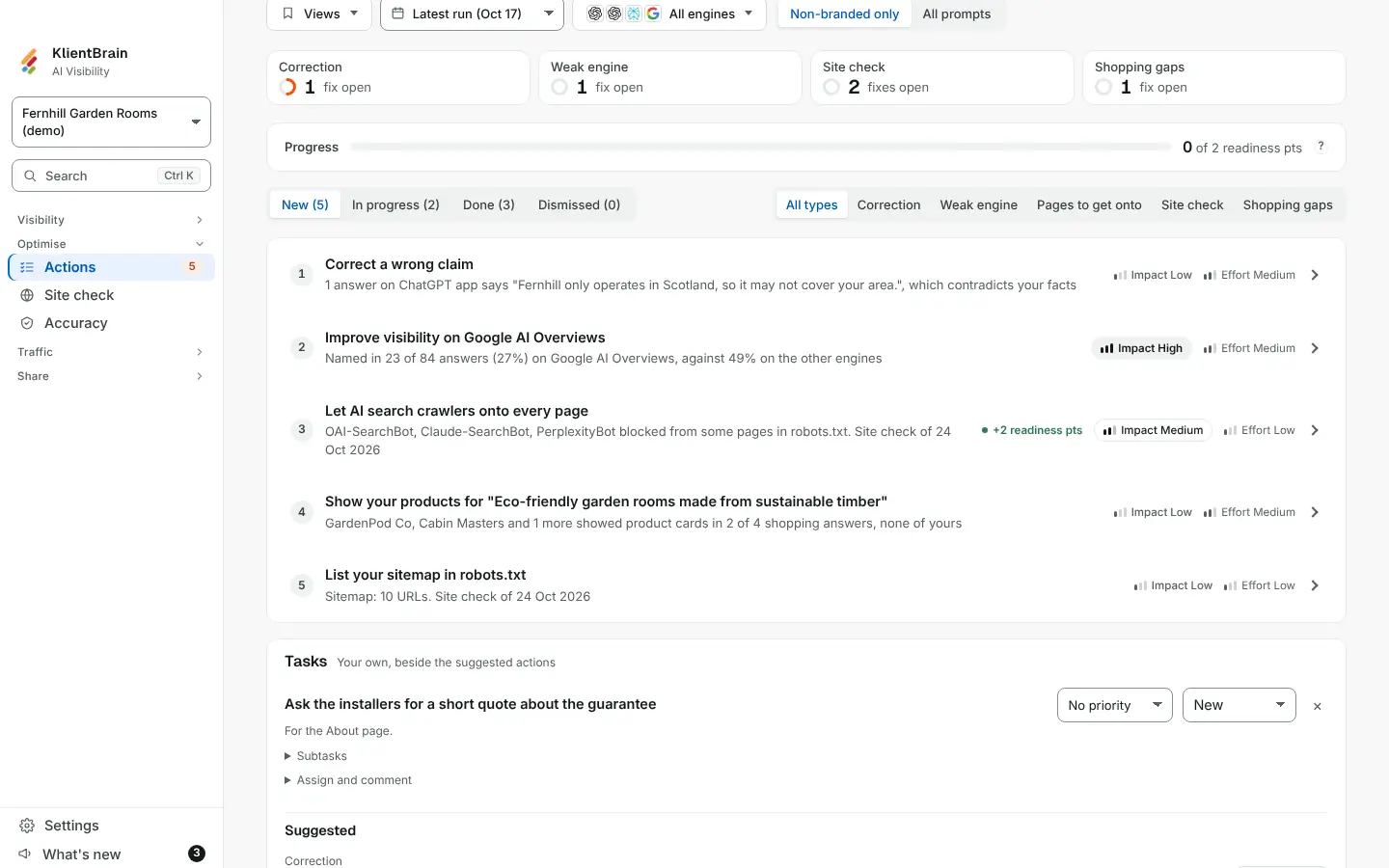
What you see
- A green pill on a site fix, such as +4 readiness pts, before Impact and Effort, on each site fix row and at the top of its side panel. Hover or tap it: "This page's AI readiness score loses about 4 of its 100 points to this problem." For a fix on several pages it adds them up across the pages it affects, each page scored out of 100.
- A Progress card above the status tabs: a bar and a line such as 6 of 23 readiness pts. The darker part of the bar is confirmed, meaning your latest Site check no longer finds the problem. The lighter part is marked done but not confirmed yet, because the problem is still found or the latest Site check did not check it.
When you do not see them
- On fixes that come from your answers (corrections, pages to get onto, weak engine and so on): they have no readiness points.
- When you have no Site check yet, or your Site check ran before page signals were kept.
How to use them
Fix the largest problem first, mark it done, then run the Site check again. When the check no longer finds the problem, the bar's darker part grows. See Site check fixes in Actions for the list of checks.